Showing posts with label schematic. Show all posts

Friday, December 20, 2013

100W Inverter Schematic

Here is a 100 Watt inverter circuit using minimum number of components. I think it is quite difficult to make a decent one like this with further less components.Here we use CD 4047 IC from Texas Instruments for generating the 100 Hz pulses and four 2N3055 transistors for driving the load. The IC1 Cd4047 wired as an astable multivibrator produces two 180 degree out of phase 100 Hz pulse trains.

These pulse trains are preamplified by the two TIP122 transistors.The out puts of the TIP 122 transistors are amplified by four 2N3055 transistors (two transistors for each half cycle) to drive the inverter transformer.The 220V AC will be available at the secondary of the transformer. Nothing complex just the elementary inverter principle and the circuit works great for small loads like a few bulbs or fans.If you need just a low cost inverter in the region of 100 W, then this is the best.

 100 Watt Inverter Circuit diagram:

100watt  inverter circuit schematic diagram
Parts:
P1 = 250K
R1 = 4.7K
R2 = 4.7K
R3 = 0.1R-5W
R4 = 0.1R-5W
R5 = 0.1R-5W
R6 = 0.1R-5W
C1 = 0.022uF
C2 = 220uF-25V
D1 = BY127
D2 = 9.1V Zener
Q1 = TIP122
Q2 = TIP122
Q3 = 2N3055
Q4 = 2N3055
Q5 = 2N3055
Q6 = 2N3055
F1 = 10A Fuse
IC1 = CD4047
T1 = 12-0-12V
Transformr Connected in Reverse
Notes:
  • A 12 V car battery can be used as the 12V source.
  • Use the POT R1 to set the output frequency to50Hz.
  • For the transformer get a 12-0-12 V , 10A step down transformer.But here the 12-
  • 0-12 V winding will be the primary and 220V winding will be the secondary.
  • If you could not get a 10A rated transformer , don’t worry a 5A one will be just
  • enough. But the allowed out put power will be reduced to 60W.
  • Use a 10 A fuse in series with the battery as shown in circuit.
  • Mount the IC on a IC holder.
  • Remember,this circuit is nothing when compared to advanced PWM
  • inverters.This is a low cost circuit meant for low scale applications.
Design tips:
  1. The maximum allowed output power of an inverter depends on two factors.The
  2. maximum current rating of the transformer primary and the current rating of the driving
  3. transistors.
  4. For example ,to get a 100 Watt output using 12 V car battery the primary current will be
  5. ~8A ,(100/12) because P=VxI.So the primary of transformer must be rated above 8A.
  6. Also here ,each final driver transistors must be rated above 4A. Here two will be
  7. conducting parallel in each half cycle, so I=8/2 = 4A .
  8. These are only rough calculations and enough for this circuit.
Source :   http://www.ecircuitslab.com/2011/06/100w-inverter-circuit-diagram-schematic.html
Continue Reading..

Thursday, September 5, 2013

2 4GHz WiFi ISM Band Scanner Description and Schematic Part 1

Have you ever wondered exactly what is going on in the 2.4GHz WiFi and ISM band around your house. What channel is it best to set your wireless router to? Why are you getting such poor performance across your WiFi network? Is your neighbour on the same frequency?

Just what is out there? This neat little gadget will sniff the airwaves and give you a graph of the signal strength vs frequency across the entire band. It connects to your computer by USB 2.0 and with the companion Windows software you can display the spectrum or save the raw data to an Excel compatible file for some more number crunching.

2.4GHz WiFi & ISM Band Scanner

It uses just two significant components, a radio module from Cypress Semiconductor and a PIC microcontroller from Microchip. Total cost to build it should be less than US$30.

The 2.4GHz Band

The 2.4GHz ISM (Industrial Scientific Medical) band is often called the WiFi band because it is used for WiFi networking (ie, 802.11 b/g/n). This band is unlicensed, meaning that you and anyone can transmit on it. As a result it has been used by a multitude of products including video transmitters, portable telephones, Bluetooth devices, wireless keyboards, toys and so on. Because you cannot see what is going in the band on you can experience strange behaviour from your wireless gadget. All of a sudden your wireless keyboard skips characters, is it because someone is using a portable phone on the same frequency?

The biggest victim is WiFi networking. This needs a lot of bandwidth, is always transmitting and is sensitive to interference. This is why people often cannot get a decent range from their wireless network and give up in disgust.

This scanner will draw a graph on your computer screen showing you the activity across the band and indicate the best frequencies to use. If you use a laptop you can also wander around and identify the culprits that are clogging the airwaves.

How It Works

Internally the scanner is very simple. It just contains a radio receiver and a microcontroller…

2.4GHz WiFi & ISM Band Scanner

The radio receiver is the Cypress CYWUSB6935 Radio SoC (System on a Chip). This is a complete low power radio transmitter/receiver chip for the 2.4GHz band and is controlled by a microcontroller over a synchronous serial (SPI) interface. The microcontroller can write to various registers in the chip to set things like operating frequency and can read other registers to retrieve data from the chip.

This chip is designed to operate over the 2.4GHz band and has the ability to listen on a frequency for any other devices that may be already using the frequency. This is to help the microcontroller select a suitably free frequency before transmitting. The chip reports the signal level as a number typically up to 30, with zero representing no signal. We use this facility in this project - simply put, the microcontroller instructs the module to step to a frequency and measure the signal level at that frequency, when done it steps the chip to the next frequency and instructs it to measure the signal level there. And so on, right across the band.

We actually do not use the transmit/receive function, which is normally the chips main purpose in life.

The microcontroller used in this project is the Microchip PIC18F2550 which integrates the complete USB 2.0 functionality. The microcontroller sets the radio chip to a frequency, reads the signal level from the chip, stores the value in its internal memory and steps on to the next frequency. This continues until the complete 2.4GHz band is covered. The 18F2550 then sends the data off to your computer using USB and your computer, using custom software, displays the resultant spectrum.

Physically the scanner is just a small box hanging on the end of a USB cable.

The Circuit

The circuit is the simplest part of this project. Click on the image or go to the download section at the bottom of this page for a full scale drawing.
2.4GHz WiFi & ISM Band Scanner Circuit Diagram

2.4GHz WiFi & ISM Band Scanner

The PIC 18F2550 microcontroller is a 28 pin part with a built in USB 2.0 interface. As mentioned before, the chip integrates everything connected with the USB including a 3.3V regulator, memory buffers and the USB transceiver. All that you need to do is to connect the USB cable to pins 15 and 16 of the chip and place a capacitor on pin 14 to help smooth the inbuilt 3.3V supply.

The clock for the microcontroller is derived from the 20MHz crystal with the two 15pF capacitors providing the correct loading for the crystal. Internally within the 18F2550 the 20MHz is divided by 5 to give 4MHz and then used to synchronise a phase locked loop (PLL) oscillator running at 48MHz. This is the main clock used within the microcontroller and is used to drive both the USB interface and the CPU. Running at 48MHz this is a speedy little chip so we do not have any issues with performance.

The ISCP connector is there so that I could reprogram the 18F2550 without pulling it out of its socket. It is mostly used for prototyping so you can leave it out if you want. Note that the 10K resistor on pin 1 of the 18F2550 is still needed to pull the reset line high.

Power for the circuit is drawn from the +5V supplied by the host computer on the USB cable. The whole circuit only draws a few tens of milliamps so it is not a significant load. This 5V is dropped to about 3V by three 1N4001 diodes to provide power for the Cypress CYWUSB6935 chip which is mounted on a small PCB (the CYWM6935 module). Each diode will drop about 0.7V resulting in a total voltage drop of about 2V. This is a crude way to derive a 3V supply but it is low cost and does the job without any hassles.

The CYWUSB6935 chip has protective diodes on its inputs, which clamp the signal line to its power supply (3V). This means that we can drive it with 5V signals from the microcontroller with series resistors to limit the current. This is the purpose of the 3.3K resistors, they limit the current in the clamping diodes to less than a milliamp when the PICs output goes to 5V.

CYWM6935 Module

The CYWUSB6935 chip comes in a tiny package designed for machine assembly and is virtually impossible for a mortal wielding a soldering iron to solder. Fortunately Cypress have assembled it into the CYWM6935 module along with two aerials, a crystal and a few capacitors. The connector used in the module is still rather tiny and non standard (or rather it does not use the 0.1" grid that we know and love), but it can be soldered to. For details of the CYMUSB6935 chip and CYWM6935 module go to here.

2.4GHz WiFi & ISM Band Scanner Circuit Diagram
Parts Listing
  •     1 x Microchip PIC18F2550-I/SP microcontroller programmed with the firmware available in the download section at the bottom of this page.
  •     1 x Cypress CYWM6935 radio module,
  •     1 x 20MHz crystal
  •     3 x 1N4001 silicon diodes
  •     4 x 3.3K resistors (quarter or half watt)
  •     1 x 10K resistor (quarter or half watt)
  •     2 x 15pF ceramic capacitors
  •     1 x 100nF multilayer ceramic capacitor 1 x 220nF polyester capacitor
  •     1 x 100uF electrolytic capacitor (6V or higher)
  •     1 x 28 pin IC socket
  •     1 x USB cable with a type A connector on one end
  •     1 x UB5 jiffy box

    Continue Reading..

    Wednesday, June 5, 2013

    Chevrolet Tahoeblazer Electrical Wiring Diagramcircuit Schematic

    Trailer Wiring Diagram on 1997 Ford Probe Wiring Diagram Harness And Electric Circuit   Circuit
    1997 Ford Probe Wiring Diagram Harness And Electric Circuit Circuit.


    Trailer Wiring Diagram on Trailer Wiring Diagram 7 Wire Circuit
    Trailer Wiring Diagram 7 Wire Circuit.


    Trailer Wiring Diagram on For A Trailer Plug And Tow Bar Socket Wiring Diagram
    For A Trailer Plug And Tow Bar Socket Wiring Diagram.


    Trailer Wiring Diagram on Chevrolet Pickup C1500 Wiring Diagram And Electrical Schematics  1997
    Chevrolet Pickup C1500 Wiring Diagram And Electrical Schematics 1997.


    Trailer Wiring Diagram on Toyota Tacoma Electrical Wiring Diagram   Circuit Schematic
    Toyota Tacoma Electrical Wiring Diagram Circuit Schematic.


    Trailer Wiring Diagram on Ford Ranger Wiring Diagram   Electrical System Circuit And Wire
    Ford Ranger Wiring Diagram Electrical System Circuit And Wire.


    Trailer Wiring Diagram on 2004 Gmc Sierra Junction Block And Relay Diagram   Circuit Schematic
    2004 Gmc Sierra Junction Block And Relay Diagram Circuit Schematic.


    Trailer Wiring Diagram on Electrical Troubleshooting And Wiring Diagram  87    Circuit Schematic
    Electrical Troubleshooting And Wiring Diagram 87 Circuit Schematic.


    Trailer Wiring Diagram on 250 And 525 Sx  Mxc  Exc Electrical System And Wiring Diagram Here
    250 And 525 Sx Mxc Exc Electrical System And Wiring Diagram Here.


    Trailer Wiring Diagram on Chevrolet Tahoe   Blazer Electrical Wiring Diagram   Circuit Schematic
    Chevrolet Tahoe Blazer Electrical Wiring Diagram Circuit Schematic.


    Continue Reading..

    Thursday, May 30, 2013

    Typical Trailer Wiring Diagramcircuit Schematic

    Telephone Wiring on Telephone Wiring Systems  Our Work Is Done From The Telephone
    Telephone Wiring Systems Our Work Is Done From The Telephone.


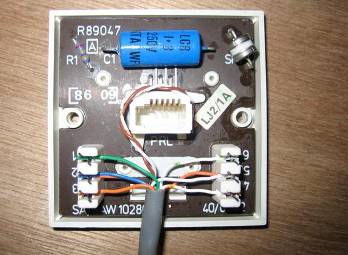
    Telephone Wiring on Guide To Rewiring Internal Uk Phone Wiring
    Guide To Rewiring Internal Uk Phone Wiring.


    Telephone Wiring on Telephone Jacks   Wire The Telephone Jack Connections
    Telephone Jacks Wire The Telephone Jack Connections.


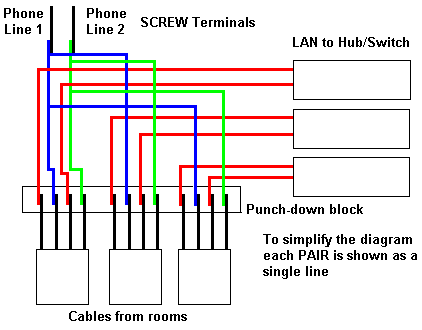
    Telephone Wiring on Tech Info   Mixed Lan And Telephone Wiring
    Tech Info Mixed Lan And Telephone Wiring.


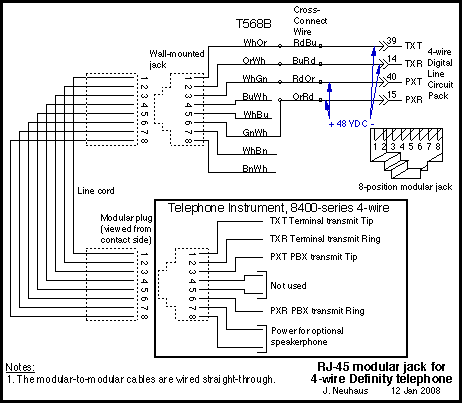
    Telephone Wiring on Avaya Definity Telephone Wiring
    Avaya Definity Telephone Wiring.


    Telephone Wiring on Cassette   Cd And 6 Speakers Audio System Wiring   Circuit Schematic
    Cassette Cd And 6 Speakers Audio System Wiring Circuit Schematic.


    Telephone Wiring on Typical 7 Way Trailer Wiring Diagram   Circuit Schematic
    Typical 7 Way Trailer Wiring Diagram Circuit Schematic.


    Telephone Wiring on 25 Pair Telephone Network Interface With 25 Modular Jacks
    25 Pair Telephone Network Interface With 25 Modular Jacks.


    Telephone Wiring on Uk Telephone Wiring
    Uk Telephone Wiring.


    Telephone Wiring on Domestic Wiring Normally Only Uses 4 Wires For
    Domestic Wiring Normally Only Uses 4 Wires For.


    Continue Reading..